Video editing

With video editing you can easily create beautiful videos for different purposes. It is possible with your computer, tablet or a mobile phone, as long as you have right tools for it. There are different applications you can use, such as Adobe, iMovie, or PowerPoint, which one will be focused more on this post. Previously I have used iMovie and Lumafusion for video editing.

First you need to make sure you have the needed material for your topic and your video. You can use photos, video clips and audio to create a masterpiece. Creating a video with PowerPoint is very simple – just make a presentation and save it as a video when it’s ready. These are the basic steps taken to make it.

  1. Add content on different slides, eg. photos and videos
  2. Add text for example to tell the story
  3. Add theme and make the presentation look visually nice (PowerPoint themes can be boring, so using Design Ideas can be a great idea)
  4. Add audio on the background to bring more feeling to the video (need to be saved on your computer first)
  5. Add transitions and automations to make the different changes in the video smooth
  6. Use timings in order to make the presentation flow forward without clicks, also make sure the videos are automatically played

When your presentation is ready, and you have proofchecked everything works, you have to save it as a video. This is the pattern you need to take: file -> export -> file format: MP4 or MOV. The presentation is loaded to the choosed file. You can still save the presentation as it is.

As a video editing tool PowerPoint wouldn’t be the first one in my mind. But as a lot of people are more familiar with it than maybe some other video editing tools, it could be a good one to make videos now and then if needed. But for more professional videos I would make some effort, and use other editing tools, since for instance the transitions between the videos are not very smooth in PowerPoint, and the overall quality and outcome of the video have some enhancing to do.

Below you can find a video about Budapest that I made with PowerPoint for the sake of practising.

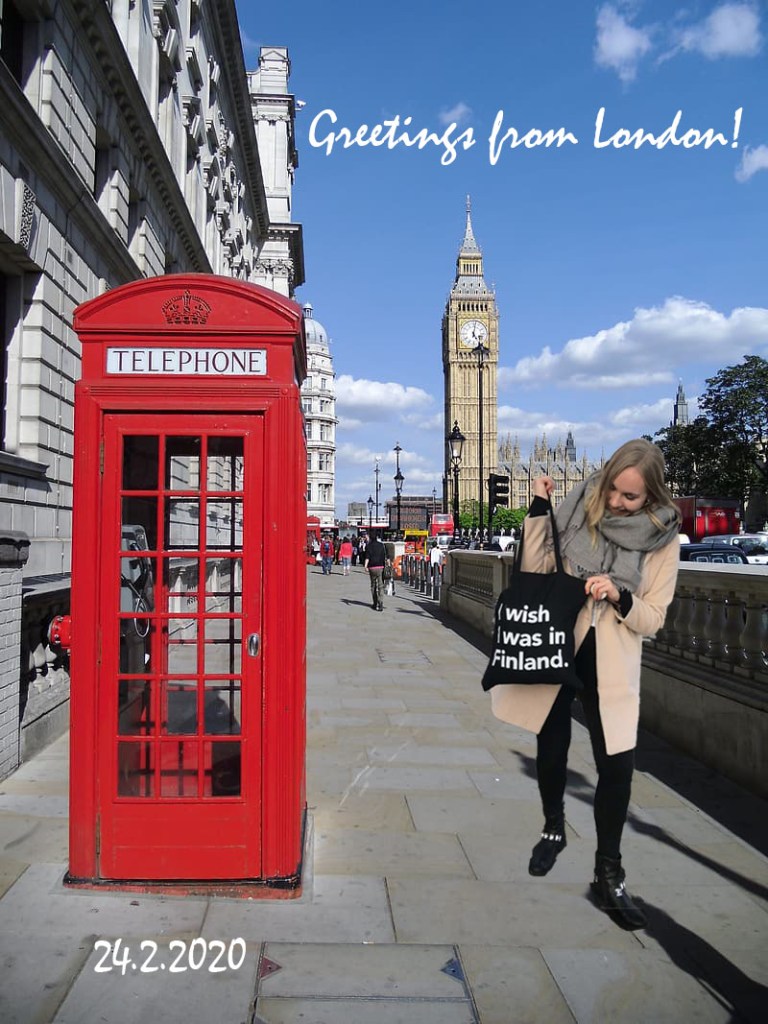
Image basics & editing

Picture basics

All the photos we see digitally, are made of pixels. They are tiny boxes of color, that will form the picture we see in front of us. Pixels cannot be seen, until zooming in the picture.

Picture dimensions means the height and width of the image. They can be represented in pixels or centimeters. The orientation of the picture can be landscape or portrait.

Resolution of the picture describes how sharp and detailed the picture is. The higher the resolution, the more quality the picture has. Resolution is good to keep in mind when resizing the image, especially from smaller to large.

Most common file formats are JPEG and PNG. JPEG uses lossy compression type when saving photos, which means that it removes some information and lowers the overall quality in order to reduce the file size. Still it provides quite high level, without a very large size. JPEG is mostly used for photographs while PNG is mostly used for graphics and illustrations. PNG uses lossless compression, which means it doesn’t remove any information and therefore the file size remains larger than in JPEG. GIF is also one file format, which is mostly used for animated images online. Other file formats are eg. RAW and BMP, which don’t use any compressions and therefore file sizes are much larger.

Picture editing

When editing images, it is important to keep a copy of the original picture since the edited picture might turn out much worse than the original. Some simple adjustments are for example cropping, resizing and rotating.

There are a lot of different editing tools, some are already available in devices and operating systems, while some are individual tools. There are both free and paid options. It is good to consider the right tool regarding how heavily the photo will be edited.

Some easy and useful example tools to edit pictures are:
Built-in software:
Windows – Paint, Photos
macOS – Preview, Appel Photos
iOS – Photos App
Android – Google Photos, Gallery App

Third-party software:
Pixlr
Adobe Photoshop
Instagram
VSCO
Photoshop Express
Microsoft Office (Word, PowerPoint, Publisher)

For practising photo editing, I used Adobe Photoshop. Unfortunately it is not free to use, but you can get a 7-day tryout period, after which the price goes up to 12 euros.

For the sake of practicing, I made a little trip to London (= Google). In order to cut myself to London (the background picture), I had to use 2 different layers in the application. Photoshop has an easy tool to crop whole objects out of picture, which I used to cut and copy myself to the first layer/picture. Finally I added the text with a text tool.

Hopefully this gave some insight about picture basics and editing. No need to travel anymore when you can just photoshop yourself to different places around the world, make your mom confused!

LinkedIn in today’s world

As we are living a year 2020 already, social media has been a big thing for years now and its value in the business world has grown a lot recently. A place for professional networking? Why not.

The world is growing smaller and smaller due to all the possibilities technology brings. LinkedIn provides unlimited professional networking and job opportunities.
Below you can find 5 reasons, why LinkedIn plays a big role in today’s working life.

  1. Build and maintain your professional network
    Through LinkedIn, the world’s largest professional network, it is easy to connect with professionals in your industry, keep in touch with your old colleagues or connect with your role models. Who needs business cards, when we can just have it all in one place? Only the sky is the limit.

  2. Building your professional brand and reputation
    In today’s work market it is beneficial to stand out from all the applicants. LinkedIn makes it easy to build and show your professional brand by customizing your profile as you like, selecting a profile photo, writing in a personal way, telling your previous experience and education – all this in one place, showing the best of your personality, strengths and skills.

  3. Searching for job opportunities and research companies
    Thousands of job opportunities in one place – sounds great. Not only you can see job openings, but it is easy also to get a better picture of the company, the culture and the employees in the same glance. Makes it easier to see if a particular position or a company would be a great fit for you, right? Looking for jobs works the other way around as well – companies can reach you regarding job openings, which is pretty nice.

  4. Keeping up with news and staying current
    As you can follow different companies, hashtags and people, it is an easy way to keep yourself up to date on the current issues in your industry and working life.

  5. Shows up in Google and gives accessibility to relevant information
    LinkedIn is a powerful network, and therefore having a profile there boosts your google search results. When possible recruiters search your name, you can give them a professional picture of you at the first glance. You can modify the privacy in settings of course, but if you wish, all the information can be out for the public. You can control what can be seen by people.

And finally, couple tips for making a great LinkedIn profile.

Video: youtube.com

Additional sources used to write this post:
TopResume
Forbes

Creation of logo and site icon

If you want to make your blog more personal, you can do it by creating a logo and site icon. Logo will appear on top of your homepage, while site icon will show next to your URL-address on top of the browser.

Logos and site icons are easy to create by yourself. I used a tool called FreeLogoDesign, which is accessible on the following address:
https://www.freelogodesign.org/

I bet internet is full of different useful tools, but I found this one very easy and quite diverse. There are multiple different templates organized in categories, which makes it easier to create a right logo for your purpose. Just pick a ready template which you can modify, or start from the scratch by adding different shapes and text.

When the logo is done, you can download it and get it sent to your email. Then just add it to your blog, but keep in mind the recommended measurements for it – for logo it is 200 x 200 and for the site icon 512 x 512 pixels.

Learning goals

The course has started, and it is time to think about the learning goals for this course. This will help me to succeed and learn better through the course.

  1. What are you willing to learn?
    During the course, I am excited to learn using new tools in the ICT world – such as this WordPress website. I have some previous experience about editing videos, but will be nice to learn new tools for this, since previously I have only used iMovie and LumaFusion. I am curious to also learn more about photoshopping and the tools used for this purpose. Other important topics from the course, such as search engine optimization and webinars will be a new topic for me, which I am eager to learn.
  2. Compare your personal strategy to the course objectives.
    I will do all the assignments timely and attend contact lessons to maximize my learning. I am also prepared to also write about my learnings to the blog regularly, since I believe that will help me to achieve my goals for this course.
  3. What grade would you like to achieve?
    My goal for this course is to get 5. 
  4. How much work are you prepared to put into the course?
    I will try to be very effective during the course, and do all the assignments as good as I can. I will spend the time needed to the assignments in order to get the results I wish.
  5. In what ways do the course topics interest you?
    A lot of the course topics are related to social media, which I am interested in. Social media plays such a great part in today’s world – both in individuals’ and businesses’ and therefore it’s important to know how to utilize it effectively.
  6. What type of businesses are you interested in?
    I find international businesses especially interesting.
  7. What previous experience do you have about the course content?
    I have had a blog before, but with a different tool. But the topics are different – this one is more about learning, while my previous one was more to keep a diary during my time abroad. I have used video editing tools before in my internship, but the tools used in this course will be different.
  8. How have your other courses prepared you for this course?
    Previous ICT-courses have got me acquainted with the ICT world, and in one of them we also built a webpage.
Design a site like this with WordPress.com
Get started